smart locks for nannies

If you’re hiring a nanny or babysitter, one of the first practical questions is:

How do I give them access to my home safely?

Handing out physical keys might seem simple, but it often creates problems for busy families. Keys can get lost. Copies can be made. And if a caregiver stops working with your family, it can be frustrating to figure out whether your home is still secure.

That is one of the reasons so many families are switching to smart locks.

A good smart lock makes it much easier to give a nanny, babysitter, or other trusted caregiver convenient access to your home while still keeping control in your hands.

With the right smart lock, you can:

  • Create unique access codes for each caregiver
  • Use one-time or time-limited codes for occasional babysitters
  • Track when someone arrives and leaves
  • Delete access in seconds if you no longer need it
  • Avoid the hassle of hiding keys or making copies

For families hiring childcare, that combination of convenience and control can be a huge win.

Quick Picks

door locks for nannies

What Families Should Look for in a Smart Lock

Not every smart lock is equally useful for households with nannies or babysitters. The best options tend to have a few important features.

smart door using

Easy code management

You want to be able to create, edit, and remove codes quickly. If your babysitter needs access tonight, or your nanny’s schedule changes, the app should make those updates easy.

Temporary access options

This is especially important for occasional sitters, back-up caregivers, dog walkers, house cleaners, or visiting relatives. Time-limited codes and one-time codes are extremely useful.

Auto-lock

This is one of the most underrated features. If your nanny or sitter forgets to lock the door on the way out, the lock can automatically secure the home after a set amount of time.

Reliable keypad

For childcare situations, keypad access is often much easier than requiring every caregiver to download an app or manage a physical key.

Strong app experience

If the app is clunky, slow, or confusing, the lock becomes harder to manage. Families usually want something simple and intuitive.

Our Top Recommendation: TP-Link Tapo DLW10

TP-Link Tapo DLW10

Approximate price: ~$50

Of all the smart locks we’ve looked at, the TP-Link Tapo DLW10 stands out as an especially attractive option for families because it offers a surprising amount of functionality for the price.

We have personally tested the Tapo and were genuinely impressed with how useful it was for childcare situations.

Here is what stood out most:

  • One-time passcodes for occasional sitters or temporary access
  • Time-limited passcodes for nannies, babysitters, or visitors
  • Very fast code management inside the app
  • You can delete a passcode in less than 10 seconds
  • Simple, clean app experience
  • Auto-lock feature, which is a huge peace-of-mind feature for families

The auto-lock feature is especially important. If your nanny or sitter accidentally leaves the front door unlocked, the lock can automatically lock after a set number of seconds or minutes. For families with young children, that extra layer of protection can matter a lot.

The biggest surprise is the price. At roughly $50, it delivers an unusual amount of value for a family-focused use case.

We were not paid for this review and are not affiliated with TP-Link.

Schlage Encode Smart WiFi Deadbolt

Approximate price: ~$230–$260

If you want a premium option from a well-known brand, the Schlage Encode is a strong contender. It is often considered one of the best overall smart locks because it combines a reputable hardware brand with robust smart features.

Why families may like it:

  • Strong reputation for security and durability
  • Built-in Wi-Fi on many versions
  • Easy code creation for recurring caregivers
  • Solid keypad experience
  • Good app controls

The biggest downside is the price. It is significantly more expensive than budget options. But for families who want a more premium, established solution, it is often worth considering.

Wyze Lock Bolt

Approximate price: ~$75–$90

The Wyze Lock Bolt is a very appealing option for families who want something simple and affordable. It may not have every advanced feature available in more expensive locks, but it can be a very practical choice for straightforward nanny or babysitter access.

Why families may like it:

  • Affordable price point
  • Simple keypad access
  • Good fit for families who do not need a lot of complexity
  • Clean, modern look

If your main goal is to stop juggling house keys without spending a lot of money, this is a strong budget candidate.

August Wi-Fi Smart Lock

Approximate price: ~$180–$250

The August Wi-Fi Smart Lock can be especially attractive for families who already live in the Apple ecosystem or want strong smart-home integrations.

One of the appealing things about August is that certain models work with your existing deadbolt hardware, which can make installation easier in some homes.

Why families may like it:

  • Strong smart-home compatibility
  • Good app features
  • Useful for households already using Apple Home or other integrations
  • Can be a sleek option if you want to keep some of your existing hardware

This is often better for tech-forward households than for families simply looking for the cheapest option.

Yale Assure Lock 2

Approximate price: ~$170–$240

The Yale Assure Lock 2 is a flexible option with multiple configurations, which makes it worth considering for families with evolving needs.

Why families may like it:

  • Flexible access options
  • Good brand reputation
  • Nice balance between design and functionality
  • Useful for families managing multiple caregivers over time

If you expect to rotate between a nanny, babysitters, relatives, and other trusted helpers, flexibility can matter, and Yale is strong in that category.

Why Smart Locks Are Especially Useful for Families Hiring Childcare

When families hire a nanny or babysitter, access to the home becomes a regular part of the relationship. That is why smart locks are often much more useful than they first appear.

They help with:

  • Professionalism: You can set up access in a clean, organized way
  • Security: You stay in control of who can enter your home
  • Convenience: No need to meet someone just to hand over a key
  • Flexibility: Easy to adapt as schedules or caregivers change
  • Peace of mind: You can remove access instantly if needed

For one-time babysitters, last-minute sitters, or rotating backup care, smart locks can be especially helpful.

Which Smart Lock Is Best for Most Families?

For most families, the answer depends on budget and priorities.

  • If you want the best value, the TP-Link Tapo DLW10 is extremely compelling.
  • If you want a premium overall option, the Schlage Encode is a strong choice.
  • If you want a lower-cost option, the Wyze Lock Bolt is worth a look.
  • If you want better smart-home ecosystem integration, the August Wi-Fi Smart Lock may be a better fit.
  • If you want flexibility for multiple caregiver scenarios, the Yale Assure Lock 2 is a solid contender.

Final Thoughts

A smart lock is one of the easiest practical upgrades a family can make when hiring a nanny or babysitter.

It gives you more control, reduces the hassle of physical keys, and makes it easier to manage access as your childcare needs change.

For many families, that extra convenience is reason enough. And for families who care deeply about security and peace of mind, it can be one of the best small investments you make.

If your family is also in the process of finding childcare, smart home setup is only one piece of the puzzle. Choosing the right nanny or babysitter matters just as much.

Parents, click here to learn more about what our community can do for you!

If you are a nanny seeking new positions, please check out our Jobs Board by clicking here.


Hi everyone! It’s Nea with Nanny Parent Connection back with this week’s video.

Some parents don’t have the time to run a nanny search themselves and instead, rely on nanny agencies to handle the search, vetting, and placement process for their family.

How does this work? How much does it cost? How is a traditional agency different than what Nanny Parent Connection offers through our Concierge Service?

Let’s explore the world of nanny agencies and why you should seriously consider checking out Nanny Parent Connection’s Concierge Service.

Click the button below to watch and we hope you find it useful!

Click Here To Watch!


If you have children, at some point you will need backup care. Perhaps it’s to cover care when your child is too sick to attend daycare or school. Maybe you are a stay-at-home parent who needs to attend a daytime appointment without your little helper, or perhaps you are unable to care for your child due to an illness or injury. Or your regular nanny might be planning to take a well-deserved vacation and you need to find coverage for a couple of days or a week.

need a nanny now

In a perfect world you or your spouse have the flexibility to stay home with your child, or you have a family member who lives nearby and can provide care on short notice (those of use who don’t have these things collectively envy you – just a little 🙂 ). But if you’re like the many Puget Sound residents who don’t have an established system for backup care, what do you do?

Nanny Parent Connection was created out of our own need for child care resources as parents. We have continued to add more resources for parents and nannies like background checks and payroll services. We also offer backup child care resources with our Last Minute Care Text Service and our Verified Care Provider Service. These are excellent options for parents to find care in a pinch, and also for care providers to pick up extra hours when they are between nanny positions or have free days in their schedules.

But if you are in need of last minute or back up child care, which system should you use? Read on to find out!

Continue reading “When and How to Use our Verified Care Provider and Last Minute Care Text Services”

 

Hi everyone, Casey from Nanny Parent Connection back with this week’s video!

Today, we’re tackling a question many nannies face near the end of the year: how to ask for a raise?

Advocating for yourself by requesting a raise can feel daunting, but with the right approach, you can have a productive and positive conversation with your nanny family.

Let’s walk through a step-by-step guide to make the process as smooth as possible! Make sure to check out the example scripts that we included as well. Let’s get started!

Watch the video to find out the details!

Click Here To Watch!


Hi everyone, Casey from Nanny Parent Connection back with an exciting announcement!

For the past five years, the Nanny Parent Connection Jobs Board has been used exclusively by our Concierge Service Search Team.

We’ve heard from many parents who would like to post their own child care need to the Jobs Board so that more nannies and sitters can get “eyes” on their child care need.

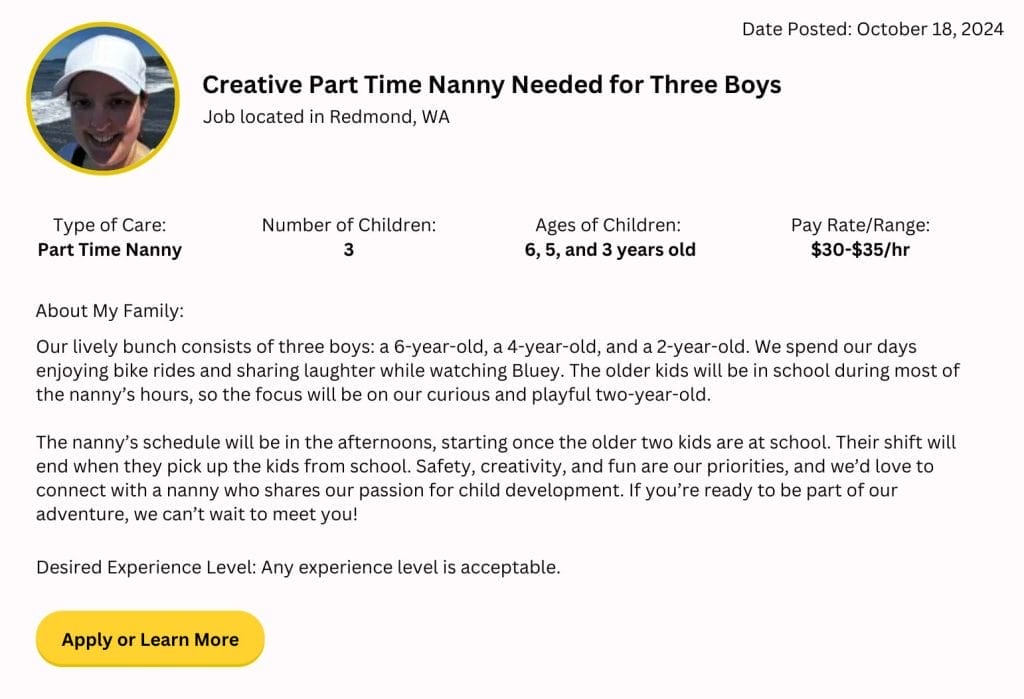
Today we are excited to announce that our new and improved Jobs Board is now live! Check it out by clicking here or view an example Jobs Board post below:


nanny jobs board


What’s new? Check out the changes we have made:

Anyone with an active Family/Parent membership can now post to the Jobs Board

Whether you are looking for a short term, temporary sitter or a long term, full time nanny, if you have an active Family/Parent membership, you can now post your need to the Jobs Board. We are currently building out an automated system where you can create a Jobs Board post directly from your Account page. In the meantime, contact our team by emailing us here and they will create a Jobs Board post for you using the information from your Profile.

Directly message families you would like to work with

Nannies and sitters! Interested in a certain Jobs Board post? Simply click on the “Apply or Learn More” button and be taken directly to the family’s profile for more information about their child care need. Want to apply? Click Private Message and introduce yourself!

Improved user experience

Our team redesigned the format of the Jobs Board posts so that they are easier to read with all pertinent information listed at the top. Jobs Board posts automatically expire after 30 days or when the family notifies us that the position has been filled.

Nannies and sitters – if you have used the Jobs Board to apply for positions that our Search Team is working to fill, not to worry. You will still find those positions listed there.

Families – ready to post your child care need to the Jobs Board? Simply click the button below and we will get the process started for you right away!

Click Here To Post!

We’re excited about the new and improved Jobs Board and would love to hear what you think. Please comment below!


Hi everyone, Casey from Nanny Parent Connection back with a great pro tip for nannies and sitters that offer temporary care!

Today, we’re going to talk about an easy and free way for care providers to offer families a way to book their childcare services online.

If you’re a nanny or sitter looking to make scheduling effortless for both you and the families you work with, Google Calendar’s “Appointment Slots” feature could be the perfect solution for you!

Let’s dive into how this feature works, the benefits it offers, and how you can set it up to allow families to book time with you for temporary nanny services.

To get started, all you need is a Gmail account and access to Google Calendar.

Watch the video to find out how to set up this free tool!

Click Here To Watch!


Welcome back everyone! It’s Casey with Nanny Parent Connection back with this week’s video. 

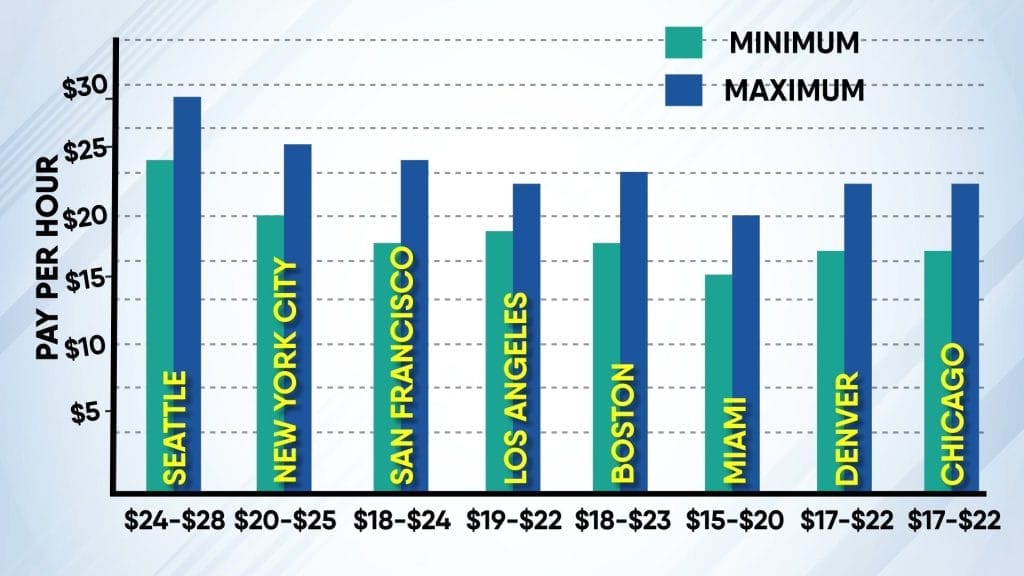
As pay rates for nannies in the Puget Sound region have continued to increase since the COVID pandemic, we started kicking around an interesting question.

Is Seattle now the most expensive market for nanny care in the United States?

In past years, cities like New York and San Francisco held the title for highest average nanny pay rates in the nation. But as our team and many of you have noticed, pay rates continue to march upwards in our region with no end in sight. 

Our team spent the last three weeks researching historical data and speaking with nannies and child care agencies across America about nanny pay rates in their areas. 

Watch the video to find out what we learned!

Click Here To Watch!


Hi everyone, Casey from Nanny Parent Connection back with this week’s video. We hope you are enjoying the final days of summer!

If you’re a nanny driving the kids to events and activities, keeping an accurate record of the miles you drive is crucial to make sure you are accurately reimbursed. What is the easiest and fastest way to track your miles?

Some nannies prefer to use a small notepad they keep in their car or a running tally on a notes application they have on their phone. Many nannies use one of the many mileage tracking apps that exist for both Apple and Android devices.

But with so many apps out there, which one should you choose?

Today, we’ll be reviewing the top 10 mileage tracker apps and breaking down the pros and cons of each to help you find the best fit for your needs. Let’s dive in!

Click the button below to watch and we hope you find it useful.

Parents – if you are working with a nanny that is driving your children, please share this video with them!

Click Here To Watch!


Welcome back! Casey from Nanny Parent Connection, here with our latest video. 

With expensive housing and food prices plus a volatile stock market, many families are looking for ways to cut down on their monthly expenses. 

Today, we’ve curated a special compilation of clips focused on practical ways to save money on childcare.

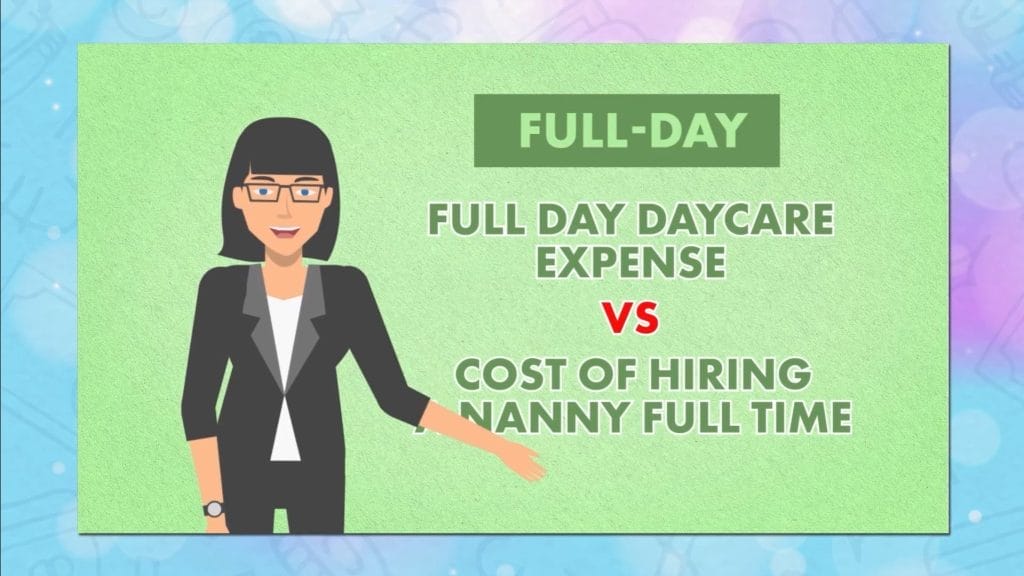
We’ve gathered some of our top tips from previous videos, covering everything from utilizing flexible spending accounts and opting for nanny shares to comparing the cost-effectiveness of daycare versus hiring a nanny. 

So sit back, relax, and get ready to learn some valuable strategies to reduce your childcare expenses!

Click the button below to watch and we hope you find it useful.

Click Here To Watch!


Hi! It’s Casey with Nanny Parent Connection, back with the latest video. I hope you’re all staying cool and hydrated with the incredibly hot weather we have had in the Seattle area over the past couple of weeks.

When the temperatures rise, one of the best ways to cool off is by visiting one of the many fantastic spray parks and water parks we have around the city. Whether you’re looking for a place for your nanny kids to splash around, or just somewhere to relax and enjoy the water yourself, Seattle has plenty of options to offer.

Today, we’re going to take you on a tour of some of the best spray parks and water parks in the Seattle area.

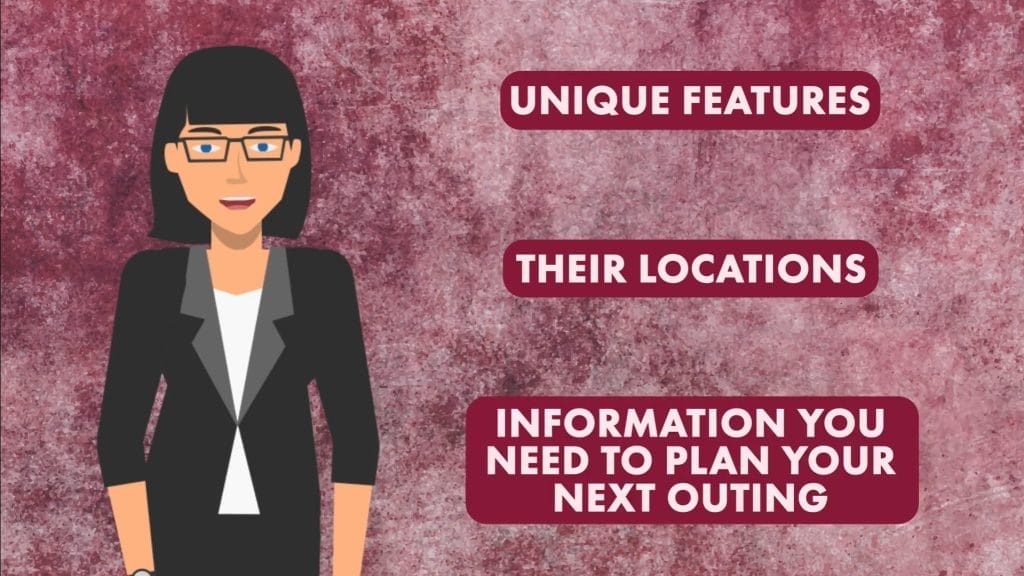
We’ll be highlighting the unique features of each park, sharing their addresses, and giving you all the information you need to plan your next outing.

So grab your sunscreen, water bottle, and let’s dive in!

Click the button below to watch and we hope you find it useful.

Click Here To Watch!