

If you’re hiring a nanny or babysitter, one of the first practical questions is:
How do I give them access to my home safely?
Handing out physical keys might seem simple, but it often creates problems for busy families. Keys can get lost. Copies can be made. And if a caregiver stops working with your family, it can be frustrating to figure out whether your home is still secure.
That is one of the reasons so many families are switching to smart locks.
A good smart lock makes it much easier to give a nanny, babysitter, or other trusted caregiver convenient access to your home while still keeping control in your hands.
With the right smart lock, you can:
- Create unique access codes for each caregiver
- Use one-time or time-limited codes for occasional babysitters
- Track when someone arrives and leaves
- Delete access in seconds if you no longer need it
- Avoid the hassle of hiding keys or making copies
For families hiring childcare, that combination of convenience and control can be a huge win.
Quick Picks

- Best Overall: Schlage Encode Smart WiFi Deadbolt (~$230–$260)
- Best Budget Option: Wyze Lock Bolt (~$75–$90)
- Best Value: TP-Link Tapo DLW10 (~$50)
- Best for Apple Households: August Wi-Fi Smart Lock (~$180–$250)
- Best for Flexibility: Yale Assure Lock 2 (~$170–$240)
What Families Should Look for in a Smart Lock
Not every smart lock is equally useful for households with nannies or babysitters. The best options tend to have a few important features.

Easy code management
You want to be able to create, edit, and remove codes quickly. If your babysitter needs access tonight, or your nanny’s schedule changes, the app should make those updates easy.
Temporary access options
This is especially important for occasional sitters, back-up caregivers, dog walkers, house cleaners, or visiting relatives. Time-limited codes and one-time codes are extremely useful.
Auto-lock
This is one of the most underrated features. If your nanny or sitter forgets to lock the door on the way out, the lock can automatically secure the home after a set amount of time.
Reliable keypad
For childcare situations, keypad access is often much easier than requiring every caregiver to download an app or manage a physical key.
Strong app experience
If the app is clunky, slow, or confusing, the lock becomes harder to manage. Families usually want something simple and intuitive.
Our Top Recommendation: TP-Link Tapo DLW10
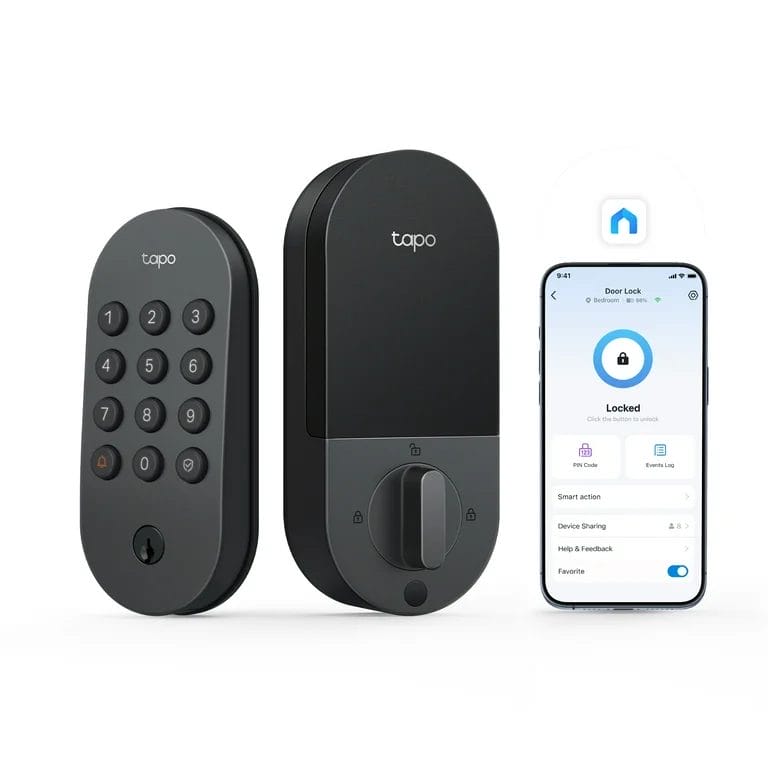
Approximate price: ~$50
Of all the smart locks we’ve looked at, the TP-Link Tapo DLW10 stands out as an especially attractive option for families because it offers a surprising amount of functionality for the price.
We have personally tested the Tapo and were genuinely impressed with how useful it was for childcare situations.
Here is what stood out most:
- One-time passcodes for occasional sitters or temporary access
- Time-limited passcodes for nannies, babysitters, or visitors
- Very fast code management inside the app
- You can delete a passcode in less than 10 seconds
- Simple, clean app experience
- Auto-lock feature, which is a huge peace-of-mind feature for families
The auto-lock feature is especially important. If your nanny or sitter accidentally leaves the front door unlocked, the lock can automatically lock after a set number of seconds or minutes. For families with young children, that extra layer of protection can matter a lot.
The biggest surprise is the price. At roughly $50, it delivers an unusual amount of value for a family-focused use case.
We were not paid for this review and are not affiliated with TP-Link.
Schlage Encode Smart WiFi Deadbolt
Approximate price: ~$230–$260
If you want a premium option from a well-known brand, the Schlage Encode is a strong contender. It is often considered one of the best overall smart locks because it combines a reputable hardware brand with robust smart features.
Why families may like it:
- Strong reputation for security and durability
- Built-in Wi-Fi on many versions
- Easy code creation for recurring caregivers
- Solid keypad experience
- Good app controls
The biggest downside is the price. It is significantly more expensive than budget options. But for families who want a more premium, established solution, it is often worth considering.
Wyze Lock Bolt
Approximate price: ~$75–$90
The Wyze Lock Bolt is a very appealing option for families who want something simple and affordable. It may not have every advanced feature available in more expensive locks, but it can be a very practical choice for straightforward nanny or babysitter access.
Why families may like it:
- Affordable price point
- Simple keypad access
- Good fit for families who do not need a lot of complexity
- Clean, modern look
If your main goal is to stop juggling house keys without spending a lot of money, this is a strong budget candidate.
August Wi-Fi Smart Lock
Approximate price: ~$180–$250
The August Wi-Fi Smart Lock can be especially attractive for families who already live in the Apple ecosystem or want strong smart-home integrations.
One of the appealing things about August is that certain models work with your existing deadbolt hardware, which can make installation easier in some homes.
Why families may like it:
- Strong smart-home compatibility
- Good app features
- Useful for households already using Apple Home or other integrations
- Can be a sleek option if you want to keep some of your existing hardware
This is often better for tech-forward households than for families simply looking for the cheapest option.
Yale Assure Lock 2
Approximate price: ~$170–$240
The Yale Assure Lock 2 is a flexible option with multiple configurations, which makes it worth considering for families with evolving needs.
Why families may like it:
- Flexible access options
- Good brand reputation
- Nice balance between design and functionality
- Useful for families managing multiple caregivers over time
If you expect to rotate between a nanny, babysitters, relatives, and other trusted helpers, flexibility can matter, and Yale is strong in that category.
Why Smart Locks Are Especially Useful for Families Hiring Childcare
When families hire a nanny or babysitter, access to the home becomes a regular part of the relationship. That is why smart locks are often much more useful than they first appear.
They help with:
- Professionalism: You can set up access in a clean, organized way
- Security: You stay in control of who can enter your home
- Convenience: No need to meet someone just to hand over a key
- Flexibility: Easy to adapt as schedules or caregivers change
- Peace of mind: You can remove access instantly if needed
For one-time babysitters, last-minute sitters, or rotating backup care, smart locks can be especially helpful.
Which Smart Lock Is Best for Most Families?
For most families, the answer depends on budget and priorities.
- If you want the best value, the TP-Link Tapo DLW10 is extremely compelling.
- If you want a premium overall option, the Schlage Encode is a strong choice.
- If you want a lower-cost option, the Wyze Lock Bolt is worth a look.
- If you want better smart-home ecosystem integration, the August Wi-Fi Smart Lock may be a better fit.
- If you want flexibility for multiple caregiver scenarios, the Yale Assure Lock 2 is a solid contender.
Final Thoughts
A smart lock is one of the easiest practical upgrades a family can make when hiring a nanny or babysitter.
It gives you more control, reduces the hassle of physical keys, and makes it easier to manage access as your childcare needs change.
For many families, that extra convenience is reason enough. And for families who care deeply about security and peace of mind, it can be one of the best small investments you make.
If your family is also in the process of finding childcare, smart home setup is only one piece of the puzzle. Choosing the right nanny or babysitter matters just as much.
Parents, click here to learn more about what our community can do for you!
If you are a nanny seeking new positions, please check out our Jobs Board by clicking here.